
Table of Contents
Tampa’s IT market is practical at its core. Defense activity and healthcare operations create steady demand. So do professional services, managed services, cloud adoption, and security needs. The work is tied to tickets, patient records, invoices, and access approvals. IT careers in Tampa are not limited to coding. They include support, systems, cloud, and cybersecurity. They also include data, compliance, and project work that keeps organizations operating.
As Justin Martin, Business Developer at Cyber Security Solutions says, “A career in the IT industry is a rewarding and challenging option where anyone can experience a variety of roles, work in almost any industry, and provide real, measurable value to their co-workers and clients.”
IT Careers In Tampa And The Roles Employers Actually Need
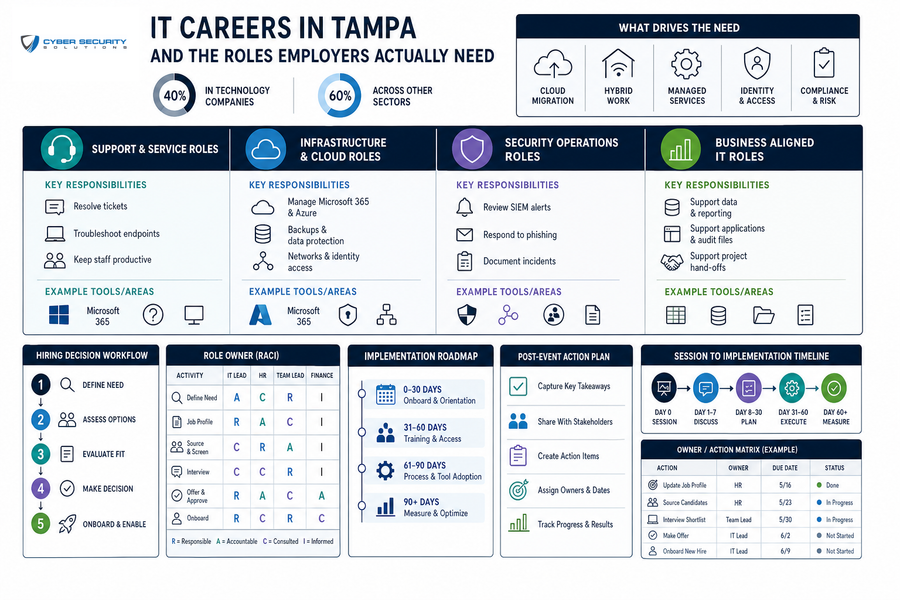
Local employers need technology talent that keeps daily work moving. Across the economy, tech workers sit inside vendors and ordinary businesses, with 40% in technology companies and 60% across other sectors. Hybrid work, cloud migration, and managed services shape that need. Identity management and compliance matter too because every login, invoice, file, and device has to be supported.
Key examples of what businesses truly need from their IT team includes:
-
Support and service roles: Resolve tickets and troubleshoot endpoints for billing teams, front desks, and mobile staff.
-
Infrastructure and cloud roles: Manage Microsoft 365 and Azure with backups, networks, and identity access.
-
Security operations roles: Review SIEM alerts, respond to phishing, monitor endpoint detection tools, and document incidents.
-
Business aligned IT roles: Support applications and data tied to audit files, client records, and project handoffs.
Tampa Tech Schools And The Local Training Landscape
Training choices should start with the outcome. Tampa tech schools and regional options include University of South Florida, The University of Tampa, and Hillsborough Community College. Tampa Bay regional options also include St. Petersburg College, technical colleges, and continuing education programs. Bootcamps and vendor certification training can also fit. Compare each option by schedule, cost, credential outcome, and hands-on practice. St. Petersburg College lists its Cybersecurity Associate in Science degree as a 60 credit hour program.
A student practicing Windows troubleshooting, a veteran documenting a lab, or a working adult comparing evening classes with certification study is building a more useful signal than a course title alone.
Bootcamp providers and partnerships change often, so verify current availability before enrolling. Ask what tools students use, what projects they complete, and what evidence of real work they leave with.
IT Education Options In Tampa Compared By Career Goal
The right path depends on career stage, learning style, and available time. IT education options in Tampa should be weighed against the work a candidate wants to prove. That may mean resolving support tickets, securing cloud accounts, documenting systems, or preparing for compliance-driven roles. National demand supports careful planning, with about 317,700 openings per year expected in computer and information technology roles.
|
Path |
Best Fit |
Business Relevant Skills |
Proof Employers Look For |
|---|---|---|---|
|
Degree programs |
Broad foundation |
Systems, software, data, security |
Coursework and projects |
|
Associate degrees |
Structured local access |
Support, networking, security basics |
Labs and transcripts |
|
Technical certificates |
Focused skills |
Desktop, cloud, networking |
Skills checks |
|
Bootcamps |
Accelerated practice |
Projects and scenarios |
Portfolio work |
|
Apprenticeships or internships |
Work exposure |
Tickets and handoffs |
Supervisor feedback |
|
Self-study |
Flexible learners |
Labs and troubleshooting |
Documented projects |
|
Certification-first routes |
Lab builders |
A+, Network+, Security+, Azure |
Certifications plus practice |
Explore Tampa’s IT Landscape
Cybersecurity Bootcamps In Tampa And The Skills That Need Support
Cybersecurity is a strong path, but it usually builds on IT fundamentals. Cybersecurity bootcamps in Tampa can help candidates practice security concepts. Hiring also values labs, projects, internships, and prior support work. Military experience can help when it shows documentation and troubleshooting discipline. Nationally, the cybersecurity workforce is short by 4.8 million people, a gap that grew 19 percent in a single year.
The practical bridge from training to work is capability, not tool memorization. A SOC is the team or function that watches alerts and coordinates response. A SIEM collects security signals from systems, and EDR watches laptops and servers for suspicious activity. Important capability areas include alert triage, endpoint investigation, incident documentation, and escalation judgment. Documentation and escalation matter as much as tool familiarity.
Build Your IT Path With Real Guidance
Exploring Tampa IT roles? Cyber Security Solutions can help you understand the skills businesses need and the next steps to grow.
College IT Programs In Tampa And Where Growth Is Happening
Growth shows up where systems must stay available and records must stay protected. College IT programs in Tampa should connect coursework to operational work, especially as projections say the tech workforce will grow twice as fast as the overall U.S. workforce. CompTIA also identifies fast-growing roles such as data scientists and data analysts at 420% over the national rate, and cybersecurity analysts and engineers at 346%. It lists software developers and engineers at 188%, IT leaders at 175%, and software QA testers at 110%.
Examples of this idea are:
-
Defense and federal adjacent work: Compliance-aware IT talent helps protect controlled information and supports secure operations.
-
Healthcare and dental operations: Patient records, imaging systems, and practice management software depend on uptime and privacy.
-
Professional services workflows: Client files, tax data, privileged communications, and fiduciary records need careful access controls.
-
Managed services growth: Support technicians, cloud administrators, and project engineers keep environments moving. SOC analysts and compliance staff do the same.
-
Cloud and identity administration: Microsoft 365, Azure, device management, and secure configuration now shape daily access.
IT Programs In Tampa For Building Job Ready Proof
Changing careers or choosing training can feel difficult because schools, certifications, and job titles often use different language. Candidates can compare IT programs in Tampa more clearly when they build proof around the work employers recognize. Veterans and working adults can translate troubleshooting, documentation, and leadership into IT readiness. Customer service and process discipline can help too.
Key examples of how to further IT skills in Tampa can include:
-
Build a small lab: Practice Windows, Microsoft 365 trial tools, networking, and virtual machines. Add cloud tasks when ready.
-
Document every project: Save screenshots, notes, tickets, and incident writeups. Keep configuration records too.
-
Match credentials to roles: Use A+ for support, Network+ or CCNA for networking, Security+ for security basics, and Azure credentials for cloud.
-
Practice business communication: Explain issues clearly, write useful updates, and show sound escalation judgment.
Information Technology Colleges In Tampa And The Next Step
Tampa offers pathways into support, cloud, cybersecurity, and compliance roles. Data, software, and project roles also matter, and information technology colleges in Tampa are one part of that path. Tampa-based firms like Cyber Security Solutions reflect demand for security operations, GCC High environments, and CMMC readiness across cloud and compliance work. Readers can contact CSS to understand how tickets, alerts, access approvals, and documentation show up in real security and compliance work. Security Ready. Compliance Ready. Always Ready.