



Table of Contents
What Are Managed IT Services for Daily Operations
Managed IT services are outsourced technology operations delivered under a defined agreement. For readers asking what are managed it services, the practical answer is ongoing monitoring, maintenance, security support, and user help for business systems.
That scope can cover cloud accounts, remote users, and applications. It can also cover backups, tickets, cyber insurance requests, and compliance documentation. Demand reflects the risk around daily operations.
The managed services market reached 401 billion dollars in 2025 and is projected to hit 847 billion by 2033. IBM reported the global average breach cost reached USD 4.4 million in 2025. The FBI reported 859,532 complaints and losses above USD 16.6 billion in 2024.
Robert Langley, VP of Compliance at Cyber Security Solutions, notes: “Managed IT services work best when they are designed to align with a company’s business goals, not just seen as standard IT solutions.”
Managed IT Services Definition For Daily Business Operations
A useful managed IT services definition includes prevention and response. The model creates recurring responsibility instead of emergency repair. It brings help desk, endpoint support, and network administration into a defined rhythm. Application support, backup management, identity management, and vendor coordination also need clear ownership.
Cybersecurity basics should be scoped without implying advanced security operations by default. Verizon reported that 68% of breaches involved a non-malicious human element.
A recent study also found that 60% of respondents named cybersecurity as the top challenge that led them to an MSP.
Key examples of how managed IT services are used include:
-
User support workflows: Help desk intake, ticket routing, escalation, and user updates keep locked accounts from delaying work.
-
System maintenance routines: Patching, device health, software updates, and recurring checks reduce avoidable interruptions.
-
Documentation and inventory: Asset records, license records, vendor contacts, and configuration records help approvals move faster.
-
Security hygiene tasks: Backups, access reviews, endpoint tools, and basic monitoring support safer operations.
Managed IT Definition Compared With Break Fix Support
The managed IT definition centers on assigned operations. Break-fix IT responds after something fails. Staff augmentation adds people to an internal team. Professional services handle defined projects, such as a Microsoft 365 migration. Managed security services operate security tools and alerts.
Managed cloud services focus on cloud accounts, licensing, backup settings, and configuration. A recent report shows that more than 72% of medium and large enterprises globally outsource at least one IT function.
Real-world snapshot: A small office may have cloud email, remote staff, sensitive client records, and one business application that needs vendor coordination. Managed support turns new employee setup, Microsoft 365 access, failed backup alerts, and application tickets into trackable work with clearer handoffs.
How Managed Services Work From Onboarding To Reviews
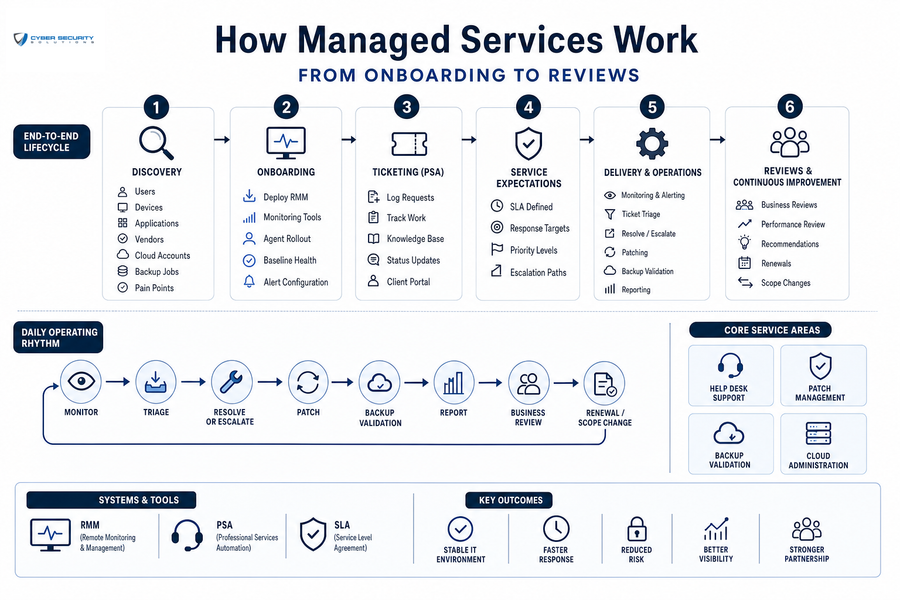
In practice, how managed services work starts with discovery. Discovery identifies users, devices, and applications. It also records vendors, cloud accounts, backups, and open pain points. Onboarding then deploys remote monitoring and management, often called RMM, to watch device health and patch status. Ticketing runs through a professional services automation system, often called PSA, to record requests and work history. An SLA defines response targets and service expectations.
Daily work includes help desk support, triage, patching, and backup validation. It also includes cloud administration, escalation, reporting, and scope changes. When a new office or application is added, reviews should confirm budget approvals and shared responsibilities.
Core capability areas include help desk support, patch management, backup validation, and cloud administration.
That operating rhythm gives leaders a clearer view of what is being handled and what still needs approval.
Managed IT Services Meaning In Regulated Environments
The managed IT services meaning changes when files include patient records, financial data, privileged communications, or CUI. Daily IT work must create evidence rather than only fix tickets. HIPAA, GLBA, and FTC Safeguards require documented control discipline. ABA Model Rules, NIST SP 800-171, and CMMC can require the same operational evidence. For an account removal request, the approval record matters as much as the disabled login. For CUI, CMMC Level 2 support connects NIST SP 800-171 practices with access control. It also depends on advanced security services, IT support, and continuous evidence collection.
Examples of how managed IT services make compliance less complex are:
-
Review who approves user access and account removal.
-
Confirm backups are tested and documented.
-
Check whether security events create usable records for audits.
Clarify Your Managed IT Next Step
See how Cyber Security Solutions can help define ownership, support, and security for your growing regulated team.
What Is An IT Managed Services Provider Responsible For
The answer to what is an IT managed services provider responsible for depends on the contract scope. The market includes MSPs, MSSPs, and co-managed IT partners. It also includes virtual CIO services, cloud providers, and project consultants. Since 60% of respondents said cybersecurity was the top challenge that led them to work with an MSP, so having defined scope clarity matters.
Before working with an MSP, be sure to know the following:
-
Scope of covered systems: Specify users, devices, cloud tools, and applications. Include networks, backups, and vendors.
-
Response and escalation rules: Define coverage windows, ticket priority, and escalation paths.
-
Security and compliance fit: Sensitive work needs evidence, logs, access controls, and policy alignment.
-
Pricing and exclusions clarity: Confirm onboarding, hardware, projects, and after-hours work. Ask whether security tools are included.
-
Reporting and review cadence: Review service reports, ticket trends, risk items, and business review meetings.
What Managed Services Include Before The Next Stage Of Growth
The managed services segment is projected to grow at about 15.3% from 2026 to 2033. Knowing what managed services include helps leaders plan growth without leaving approvals, tickets, backups, or compliance evidence behind. Organizational change becomes harder when teams already depend on cloud logins, billing systems, shared files, and line-of-business applications.
Examples of different types of managed services include:
-
Fully Managed IT Services for organizations that want one accountable operating model.
-
Professional Services IT Services for defined projects and time-bound improvements.
-
Application managed services and support for business software stability.
-
Managed Cloud Services for identity, licensing, backup, and configuration support.
-
CMMC Level 2 support for organizations handling CUI and NIST SP 800-171 requirements.
Explore What Managed IT Services Are Best For You
87% of businesses say managed IT services is crucial to their digital transformation strategy. Adding managed IT services is not about replacing internal teams or well-loved systems, it’s about making technology easier to use, more accessible, and a true driver behind attaining business goals.
At Cyber Security Solutions, we provide Tampa and other Florida businesses with top-tier IT and cybersecurity services. With over 120 companies supported, and 11+ years helping businesses remain vigilant against cyber risks, CSS is a leader in managed IT services.
To learn more about how managed IT services can help your business be more secure, access more growth opportunities, and have IT systems that are easy to use, contact us today.