


Table of Contents
-
Managed IT Services Benefits That Show Up In Daily Operations
-
Managed Services Advantages Across Support, Security, And Compliance
-
Managed IT Benefits For Regulated And Contract-Driven Organizations
-
Managed IT Services Advantages To Review Before Choosing A Provider
-
Benefits Of Managed IT Services With The Right Operating Partner
Delayed invoices, locked accounts, stalled case work, unavailable patient records, CUI workflows, and tax season tickets point to the same operational issue: IT, security, and compliance can’t run on separate tracks anymore.
That’s why the benefits of managed IT services matter now. Managed services is a strategic focus for 99% of organizations, and the market reached 401 billion dollars in 2025 and is projected to hit 847 billion dollars by 2033. The driver isn’t hype. It’s fewer recurring issues, cleaner documentation, faster support, and stronger audit readiness when tickets, approvals, logs, devices, and evidence share the same ownership model.
Justin Martin, Business Developer at Cyber Security Solutions, notes: “Operational continuity improves when support tickets, security alerts, access approvals, and audit evidence all move through the same ownership model and documented response path.”
Importance Of Managed IT Services For Keeping Work Moving
Leadership should view IT as an operational maturity issue, not only a help desk expense, especially as worldwide spending on IT services is expected to hit $6.37 trillion in 2027.
-
Fewer repeat disruptions: Monitoring, patching, and device management keep the same printer, laptop, imaging workstation, or billing system from generating repeat tickets.
-
Clearer support ownership: Teams know who handles user accounts, vendor tickets, security escalations, devices, and after-hours emergencies.
-
Stronger compliance habits: Logs, policies, access reviews, and evidence collection stay current instead of becoming audit-week cleanup.
-
Better planning control: Licensing, hardware refreshes, and budgets align with actual users, devices, renewal dates, and contract deadlines.
The importance of managed IT services becomes practical when scope is transparent and fully managed or co-managed support works in good faith with current providers. Support, security monitoring, compliance documentation, and cloud administration all need clear ownership.
Managed IT Services Benefits That Show Up In Daily Operations
Picture a dental practice where imaging workstations, scanners, Microsoft 365, and the practice management system all need to work before the first patient sits down. If one login fails or an endpoint alert sits unresolved, appointments back up and patient records become harder to access at the point of care.
Managed IT services benefits show up in those small moments. MFA prompts get enforced without locking out the front desk, Microsoft 365 access is tied to approved roles, EDR alerts have a clear owner, and printer or scanner coverage is included where the scope says it is.
About 55% of companies have approached managed service providers for value-added services and to reduce security risks. One platform and one accountable team reduce handoffs, licensing confusion, unresolved alerts, and evidence gaps.
Managed Services Advantages Across Support, Security, And Compliance
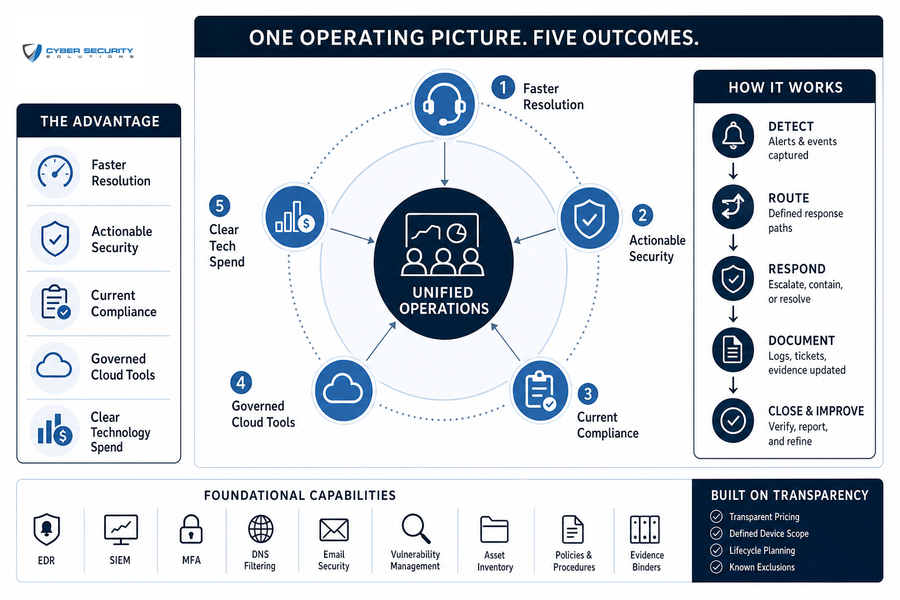
Managed services advantages are clearest when support, security, and compliance work from the same operating picture, not three separate inboxes.
-
Support tickets get handled faster: Defined response paths, remote support, onsite options, and documented priorities reduce disruption when a payroll laptop fails or a partner portal login breaks. Cyber Security Solutions documents initial contact expectations that include 30 minutes for critical issues, and company evidence cites approximately 99% first-call resolution.
-
Security alerts become actions: EDR, SIEM, MFA, DNS filtering, email security, and vulnerability management move alerts to escalation, containment, or closure with clear ownership.
-
Compliance evidence stays current: SSP updates, POA&M tracking, audit logs, policies, asset inventories, and evidence binders are maintained as work happens, not rebuilt after a contract officer asks.
-
Cloud tools stay governed: Microsoft 365, Google Workspace, and Apple devices need access controls, licensing review, and secure configuration tied to onboarding, offboarding, approvals, and support tickets.
-
Technology spend gets clearer: Transparent pricing, defined device scope, lifecycle planning, and known exclusions help leaders budget without surprise add-ons.
Explore Managed IT Services
Managed IT Benefits For Regulated And Contract-Driven Organizations
Compliance-aligned IT matters because a missed access review, unmanaged laptop, or missing audit log can delay contracts, claims, filings, or client obligations. The Managed Services segment is projected to grow at a CAGR of 6.9% from 2026 to 2034, reaching approximately $430 billion, but the useful test is simple: does the service produce defensible outcomes, or just tool deployment?
-
CUI workflows: CMMC, NIST SP 800-171, and DFARS work require asset scoping, enforced MFA, SSP and POA&M maintenance, artifact trails, incident response, mock assessments, and readiness gates.
-
Patient and client files: HIPAA 45 CFR 164.308(a)(8), ABA Model Rule 1.1, and vendor oversight depend on governed accounts, encryption, retained logs, and documented review.
-
Tax and financial data: IRS Pub 4557, GLBA, SEC, and FINRA expectations connect phishing controls, backups, access reviews, cyber insurance support, and endpoint protection to daily operations.
Turn IT Delays Into Managed Control
Connect support, security, and compliance under one operating model with Cyber Security Solutions. Move from recurring tickets to cleaner oversight.
Managed IT Services Advantages To Review Before Choosing A Provider
Changing IT support or adding a security overlay takes coordination and trust, especially when a current provider already knows the environment. As the managed services segment is projected to grow at a CAGR of 6.9%, managed IT services advantages only hold up when responsibilities, exclusions, paid add-ons, and escalation paths are clear from the start.
-
Confirm scope first: List users, servers, mobile devices, printers, scanners, IoT systems, and specialized equipment.
-
Assign ticket ownership: Know who handles helpdesk tickets, vendor coordination, security escalations, and after-hours emergencies.
-
Request operational visibility: Review patching, vulnerability scans, audit logs, backups, MFA enforcement, endpoint protection, and security awareness activity.
-
Review commercial terms: Confirm included services, exclusions, paid add-ons, contract term, pricing changes, data return, offboarding support, and exit provisions.
-
Validate CMMC readiness: Review CUI scope, SSP status, POA&M tracking, evidence binders, mock assessment results, staff interview prep, C3PAO scheduling support, and the readiness confirmation gate.
Benefits Of Managed IT Services With The Right Operating Partner
The practical goal is not more tools for their own sake; it is fewer avoidable interruptions, clearer ownership, stronger compliance evidence, better security visibility, and more predictable technology planning. At Cyber Security Solutions, we bring veteran-founded discipline, U.S.-based support, transparent scope, and a unified managed IT, security, and compliance platform to that work.
If you’re trying to stop the same locked accounts and stalled workflows from turning into recurring tickets, clean up audit evidence, or understand what belongs in CMMC scope, contact Cyber Security Solutions for a straightforward conversation about managed IT, security, compliance, SSP status, evidence readiness, or C3PAO preparation. No pressure.